Annotation Task Design and Human Factors
The shape of an annotation task decides its quality long before the first label is applied. A task that is clear, well-scoped, and comfortable to do produces consistent data. One that overloads or exhausts the people doing it produces noise, no matter how good the guidelines are. Design the task for the human who will sit with it for hours.
Estimate task complexity before you scale
Every annotation decision carries a cognitive cost, and that cost compounds over thousands of items. A binary judgment, such as whether a text is offensive or not, is far cheaper than a multi-label one, such as assigning all applicable emotions from a set of eight, which is cheaper again than span-level work like marking every named entity and its type. Estimate the complexity honestly, because it drives both the budget and the error rate. Where a task is genuinely complex, break it into a sequence of simpler decisions rather than asking for everything at once. The Masakhane named-entity effort kept its per-language tasks tractable by giving each language its own small team working to one shared, simple protocol rather than a single sprawling labelling scheme (Adelani et al., 2022). Use the pilot to measure the real time per item, and let that number, not optimism, set the schedule.
Design against annotator fatigue
Quality falls as attention does. Long unbroken sessions, monotonous batches, and ambiguous items all wear annotators down, and tired annotators reach for the easy label rather than the right one. Plan for this with short batches, regular breaks, and rotation across task types where the project allows it. Fatigue is not only a quality problem. For tasks that expose annotators to hate speech, abuse, or other distressing material, which is common in African sentiment and safety datasets, prolonged exposure becomes a wellbeing problem, and it calls for content warnings, the freedom to skip or stop, workload limits, and access to support (covered in the annotation and data governance chapters). Treating annotation as skilled, sustainable work rather than disposable clicks is also what keeps a good team available for the next project (Sambasivan et al., 2021).
Let the interface do some of the work
The annotation tool is part of the task design, not a neutral container. A good interface removes whole classes of error before they happen. It constrains inputs to the allowed label set so a typo cannot become a new category, it shows the surrounding context an annotator needs to judge a word inside a sentence, and it uses keyboard shortcuts so the work is fast and the physical strain is low. Two constraints matter especially for African projects. Many annotators work on modest hardware over intermittent, metered connections, so the tool should be light, tolerant of dropped connections, and usable on a small screen. It should also handle the orthography of the target language properly, including diacritics and non-Latin scripts, so that what the annotator types is what gets stored. A task that is awkward to do will be done awkwardly.
A labeling configuration
These principles are not abstract: they are choices you make in the labeling configuration. The examples throughout this playbook use the Label Studio configuration format, an open XML format that several annotation tools support (including the playbook's companion tool, AfriAnnotate), so the configs here are portable rather than tied to any one product. A config is a small, readable document that defines exactly what the annotator sees and what they are allowed to do. The example below sets up a single-label sentiment task of the kind behind AfriSenti (Muhammad et al., 2023).
<View>
  <!-- The source text sits in its own card so the annotator can always tell
       the content apart from the instruction prompts and labels below it. -->
  <View style="background:#FBF7F0; border:1px solid #E7DDCB; border-radius:8px; padding:14px 16px; margin-bottom:18px;">
    <Text name="text" value="$text"/>
  </View>

  <!-- One choice only, drawn from a fixed set: a typo cannot become
       a new category, and the decision stays a cheap binary-style call. -->
  <Choices name="sentiment" toName="text" choice="single" required="true">
    <Choice value="Positive" hotkey="1"/>
    <Choice value="Neutral"  hotkey="2"/>
    <Choice value="Negative" hotkey="3"/>
  </Choices>

  <!-- An explicit escape hatch, so a tired or unsure annotator skips
       rather than guessing. These get routed to adjudication. -->
  <Choices name="flag" toName="text" choice="single">
    <Choice value="Code-mixed / wrong language" hotkey="8"/>
    <Choice value="Unclear, needs a second opinion" hotkey="9"/>
  </Choices>
</View>
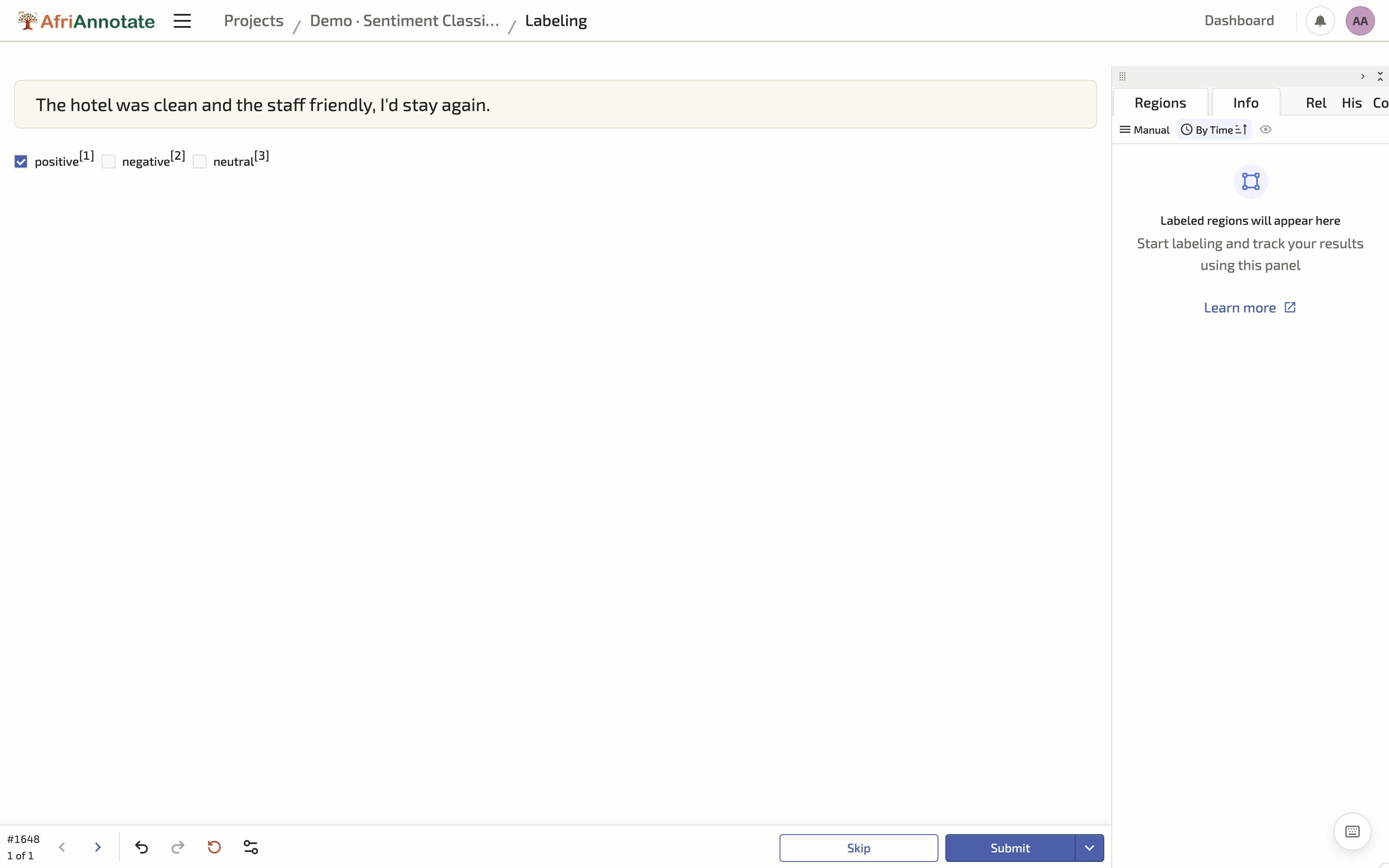
Three of the design points above are enforced directly in this config. choice="single" with a fixed <Choice> set constrains the input to the allowed labels, so the interface, not the guideline document, prevents stray categories. The hotkey attributes let an annotator work entirely from the keyboard, which is both faster and gentler on the hands over a long session. And the flag block gives the explicit skip route the fatigue discussion calls for, rather than forcing a guess. Wrapping the text in its own styled <View> is a small touch that matters over thousands of items: it sets the content apart from the prompts and labels, so an annotator never confuses what they are reading with what they are being asked.
That configuration renders, for the annotator, as a clean single-task screen where the source text stands out from the question:
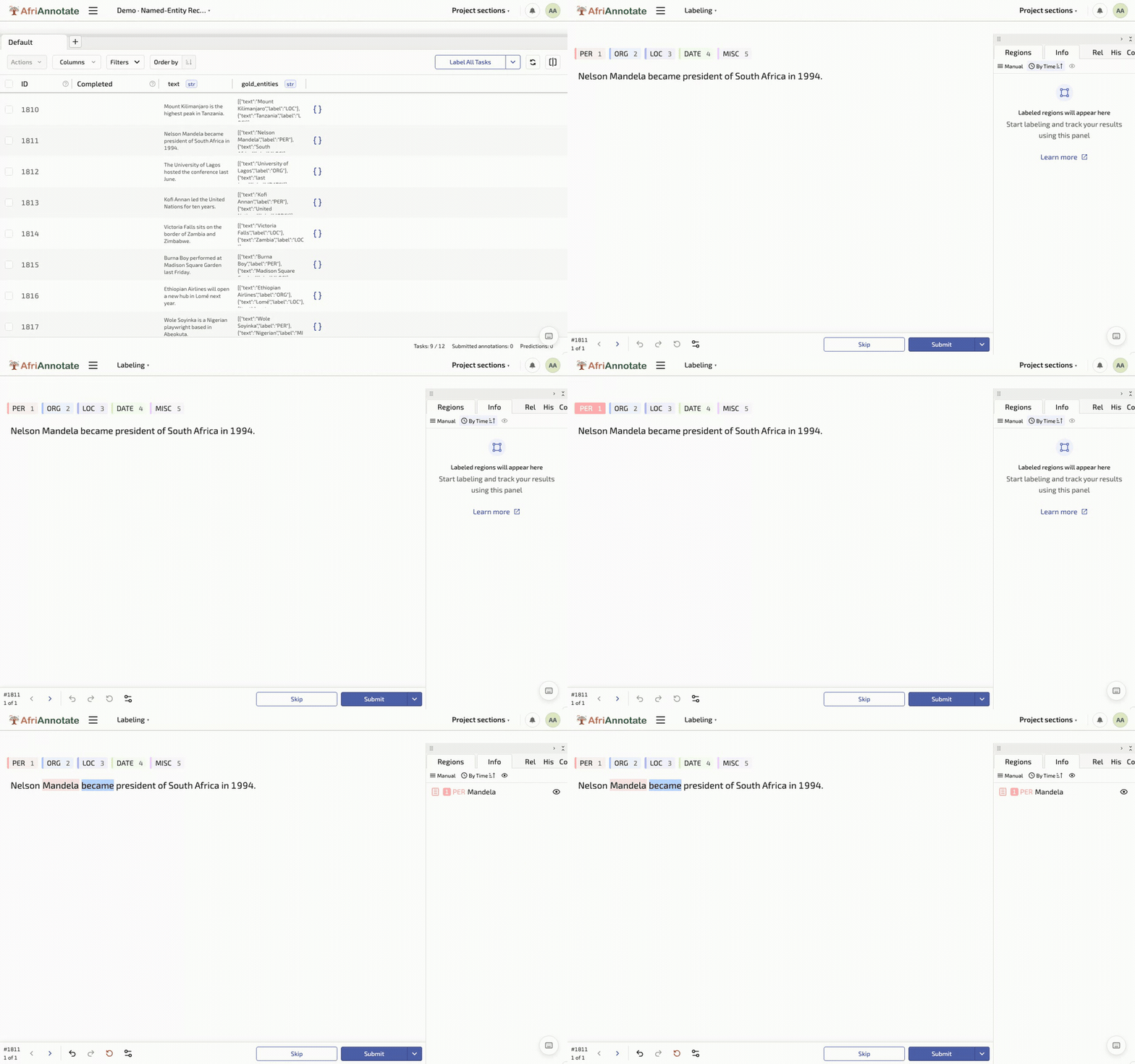
For a span-level task such as named-entity recognition, the same format expresses a harder job by swapping <Choices> for <Labels>, which lets the annotator select a stretch of text and tag it:
<View>
  <Labels name="entities" toName="text">
    <Label value="PER" hotkey="1" background="#e8743b"/>
    <Label value="ORG" hotkey="2" background="#19a979"/>
    <Label value="LOC" hotkey="3" background="#945ecf"/>
    <Label value="DATE" hotkey="4" background="#13a4b4"/>
  </Labels>
  <Text name="text" value="$text"/>
</View>
The $text field in both configs maps straight onto the text field in the cleaned JSONL records from the Data Collection chapter, so the import step is just uploading that file: each line becomes one task, and the provenance fields ride along unchanged. Starting from a tiny config like this, and growing it only when a pilot shows it is needed, keeps the task tractable in the way the complexity discussion above recommends.
Selecting a span and tagging it as an entity, in the AfriAnnotate editor:
From a config to a running project
Defining the config is only the first step; loading data and labeling it is the rest. The short walkthrough below shows the full loop, creating a project, uploading a CSV of tasks, choosing the labeling template, and annotating every task:
